What These Tools Are
Three separate tools sit on the GST menu, and they answer three different questions:
| Tool | Answers | Cost |
|---|---|---|
| 🛡 GST Smart Advisor | "Is anything wrong in my own books, and what credit am I missing?" | Free — reads your local data |
| 🩺 GSTIN Health & Supplier Filing | "Are my suppliers registered, and have they actually filed?" | One lookup credit per check |
| 🔎 Find GSTIN by PAN | "What GSTINs does this business hold?" | One lookup credit |
The Advisor is the one to run most often, because it costs nothing and catches the errors that turn into notices.
Opening the Advisor
Open the GST menu → 🛡 GST Smart Advisor. The Cross Checks run immediately against the open company for the current financial year. Change the period and click ↻ Re-run Checks to refresh.
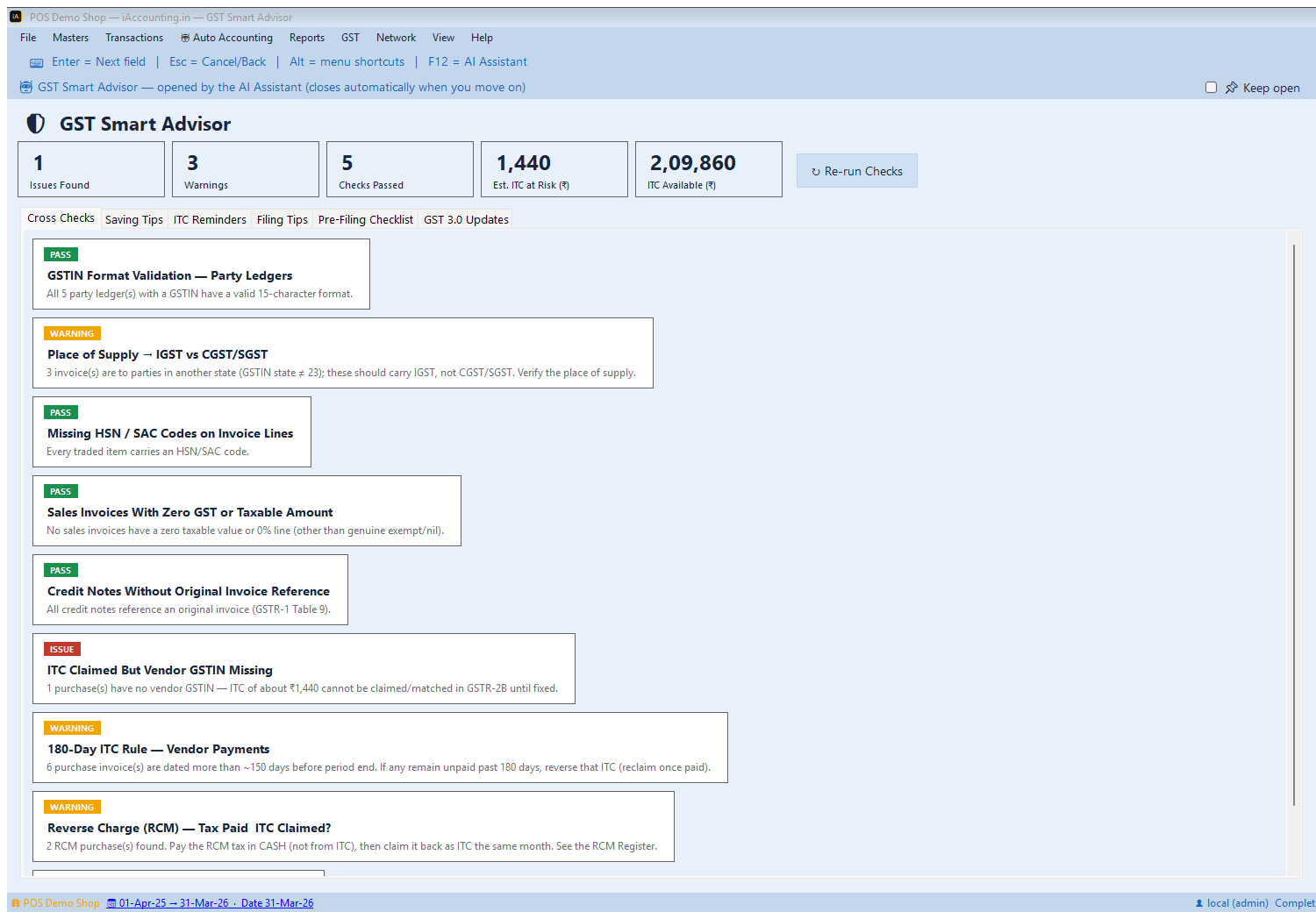
The Summary Strip
| Tile | Meaning |
|---|---|
| Issues Found | Things that will block filing or block credit. Fix these. |
| Warnings | Things needing your judgement — often legitimate, but confirm. |
| Checks Passed | Clean results. Useful as evidence that you looked. |
| Est. ITC at Risk (₹) | Input credit you currently cannot claim because of the issues found. |
| ITC Available (₹) | Total input tax on this period's purchases. |
Read ITC at Risk against ITC Available — that ratio tells you how much of your credit is jeopardised by data problems you can fix today.
The Nine Cross-Checks
Each runs a real query over your books for the period. Here's what every one looks for, why it matters, and what to do.
1. GSTIN Format Validation — Party Ledgers
Looks for: any party ledger whose GSTIN isn't a valid 15-character GSTIN.
Why: a malformed GSTIN fails at the portal — the invoice is rejected in GSTR-1, and on the purchase side it can't be matched in 2B. It's usually a typo or a partially typed number.
Fix: the card names the offending ledgers. Open each in Masters → Ledgers and correct it — ideally by typing the GSTIN and using 🔍 Fetch so the portal fills the rest.
2. Place of Supply → IGST vs CGST/SGST
Looks for: Sales or Purchase invoices where the party's GSTIN state code differs from your company's state — meaning the supply is inter-state and should carry IGST.
Why: CGST/SGST and IGST are different heads in GSTR-3B. Getting the split wrong misstates the return even when the total tax is right.
Fix: verify the place of supply on those invoices. Note this is flagged as a warning, not an issue, because there are genuine exceptions — the place of supply isn't always the customer's registered state.
If it says "Set the company's state code", the check couldn't run at all. Fix that in the Company master first; several other things depend on it.
3. Missing HSN / SAC Codes on Invoice Lines
Looks for: items actually traded this period that have no HSN/SAC code on their master.
Why: HSN is mandatory on B2B invoices and drives the HSN summary in GSTR-1. Missing codes stop the return being filed correctly, and are also required on an e-invoice.
Fix: add the HSN to each item master. It only flags items you've actually bought or sold, so the list stays practical.
4. Sales Invoices With Zero GST or Taxable Amount
Looks for: sales invoices containing a line with zero value or a 0% GST rate.
Why: some of these are genuine — exempt and nil-rated supplies exist. Others are data-entry slips where a rate was never set on the item, which quietly under-declares your output tax.
Fix: open the flagged invoices and confirm each zero is deliberate. If it's a missing item rate, fix the item master and re-issue.
5. Credit Notes Without Original Invoice Reference
Looks for: Sales Return vouchers with no reference number.
Why: GSTR-1 Table 9 links a credit note to the original invoice. Without that reference the credit note can't be tied back, and your output-tax adjustment is at risk.
Fix: edit each credit note and enter the original bill number in the reference field.
6. ITC Claimed But Vendor GSTIN Missing
Looks for: Purchase vouchers whose supplier ledger has no GSTIN — and totals the input tax involved.
Why: this is the check that costs real money. Without the vendor's GSTIN the purchase can never match in GSTR-2B, so that credit is unclaimable. The card states the rupee figure, and it feeds the ITC at Risk tile.
Fix: get the GSTIN from the supplier's invoice and add it to their ledger. If they're genuinely unregistered, there was never any credit to claim — but then confirm you haven't recorded input tax on that purchase.
7. 180-Day ITC Rule — Vendor Payments
Looks for: purchase invoices dated more than about 150 days before the period end.
Why: if you haven't paid a supplier within 180 days of the invoice date, the ITC you claimed must be reversed with interest — and reclaimed once you pay. The check deliberately warns at ~150 days so you have a month's notice rather than a deadline that has already passed.
Fix: cross-check the flagged invoices against your outstanding payables. Pay what you can before the 180 days elapse; reverse the ITC on anything you can't.
8. Reverse Charge (RCM) — Tax Paid & ITC Claimed?
Looks for: purchases from parties marked as reverse-charge on their ledger.
Why: RCM has a two-step obligation people routinely half-complete. You must pay the tax in cash — it cannot be set off from existing ITC — and then claim it back as input credit in the same month. Skip the first half and you've under-paid; skip the second and you've lost credit.
Fix: open the RCM Register (GST menu) for the detail, pay the tax in cash, then claim it.
9. Duplicate Invoice Numbers
Looks for: the same voucher number used more than once within a voucher type.
Why: the GST portal rejects duplicate invoice numbers outright. One duplicate can fail an entire GSTR-1 upload.
Fix: renumber the duplicates before filing. This is flagged as an issue because there is no judgement call — it will fail.
What to Fix First
Work in this order — it's roughly cheapest-first and unblocks the most:
- Duplicate invoice numbers — will fail the upload outright.
- Malformed GSTINs and missing vendor GSTINs — block filing and block credit, and the second has a rupee figure attached.
- Missing HSN codes — required for GSTR-1 and e-invoices.
- Credit-note references — quick to add, protects your output adjustment.
- Place of supply, zero-rated lines, RCM — decisions, not typos. Review them properly.
- 180-day list — a payables conversation, usually not urgent this week.
ITC Reminders — The Credit You're Missing
The ITC Reminders tab is an input-credit maximiser: a set of cards for credit businesses routinely fail to claim, each badged (Often Missed, Mandatory, Reclaimable, One-Time). The most commonly missed:
- Software, cloud and SaaS — Microsoft 365, AWS, your accounting software. Frequently missed entirely.
- Commercial rent at 18% — office, shop or godown rent from a registered landlord.
- Courier, freight and logistics — keep the tax invoices and LRs.
- Capital goods in the year of purchase — full ITC up front on plant, machinery and computers; it doesn't need spreading.
- Reclaiming reversed ITC — credit reversed under the 180-day rule comes back once you pay.
- Opening stock at first registration — claim ITC on stock held the day before registration, via ITC-01 within 30 days.
- The set-off order — IGST first, then CGST, then SGST. The prescribed order minimises the cash you actually part with.
Saving Tips
Broader structural savings rather than month-to-month credit: reconciling 2B monthly so nothing is left unclaimed, the composition scheme if you're under the threshold (low flat rate, far less compliance, but no ITC), exporting under an LUT so IGST isn't locked up in a refund cycle, and the inverted-duty refund where your inputs are taxed higher than your output — common in textiles and EVs.
Filing Tips & Deadlines
The Filing Tips tab is mostly about dates, which is where money is quietly lost:
- Credit-note deadline — issue and report by 30 September of the next financial year, or the output-tax adjustment is gone.
- ITC claim deadline — claim a year's ITC by 30 September of the following year (or the annual return, whichever is earlier).
- Rule 86B — above ₹50 lakh monthly taxable turnover, at least 1% of output tax must be paid in cash, not entirely from ITC.
- GSTR-1 vs GSTR-3B — reconcile monthly; mismatches trigger notices.
- IMS — the Invoice Management System has been live since October 2024. Accept or reject inward invoices within the window to control your ITC.
- Refund the idle cash ledger — a balance sitting in the electronic cash ledger can be refunded under RFD-01. Don't leave it there.
GST 3.0 Updates
A briefing on the rate rationalisation effective 22 September 2025 — the move to a two-slab structure of 5% and 18%, with 40% on selected luxury and sin goods, and the removal of the 12% and 28% slabs.
The practical consequence is a chore: every item master's tax rate needs re-checking. Medicines and medical devices moved to 5% or Nil, much of FMCG to 5%, agricultural equipment to 5%, EV batteries to 5%. And where a rate came down, anti-profiteering means the benefit is expected to reach your customers — so your selling prices need looking at too, not just your tax rates.
Pre-Filing Checklist
An interactive checklist in three sections, with your ticks saved per company so you can work through it across several sittings.
- Sales & Output Tax — sales register matches GSTR-1 turnover, HSN summary split correct, B2B GSTINs correct, credit notes linked, exports carry the LUT/bond number, e-invoice IRNs generated where applicable, nil-rated and exempt separated.
- Input Tax Credit — books ITC equals GSTR-2B with no provisional credit (Rule 36(4)), nothing claimed on blocked items (Section 17(5)), RCM paid in cash before claiming it, 3B reconciled to the purchase register, last month's differences resolved, cash-ledger balance verified, Rule 42/43 reversal computed.
- GST 3.0 / General — item rates updated to the new slabs, old 12%/28% re-mapped, pharma moved, rate cuts passed on, LUT filed for the year.
A Reset Checklist button clears the ticks for the next period.
🩺 GSTIN Health & Supplier Filing
The Advisor checks your data. This tool checks the people you buy from — using the portal's public lookups, so no OTP is needed.
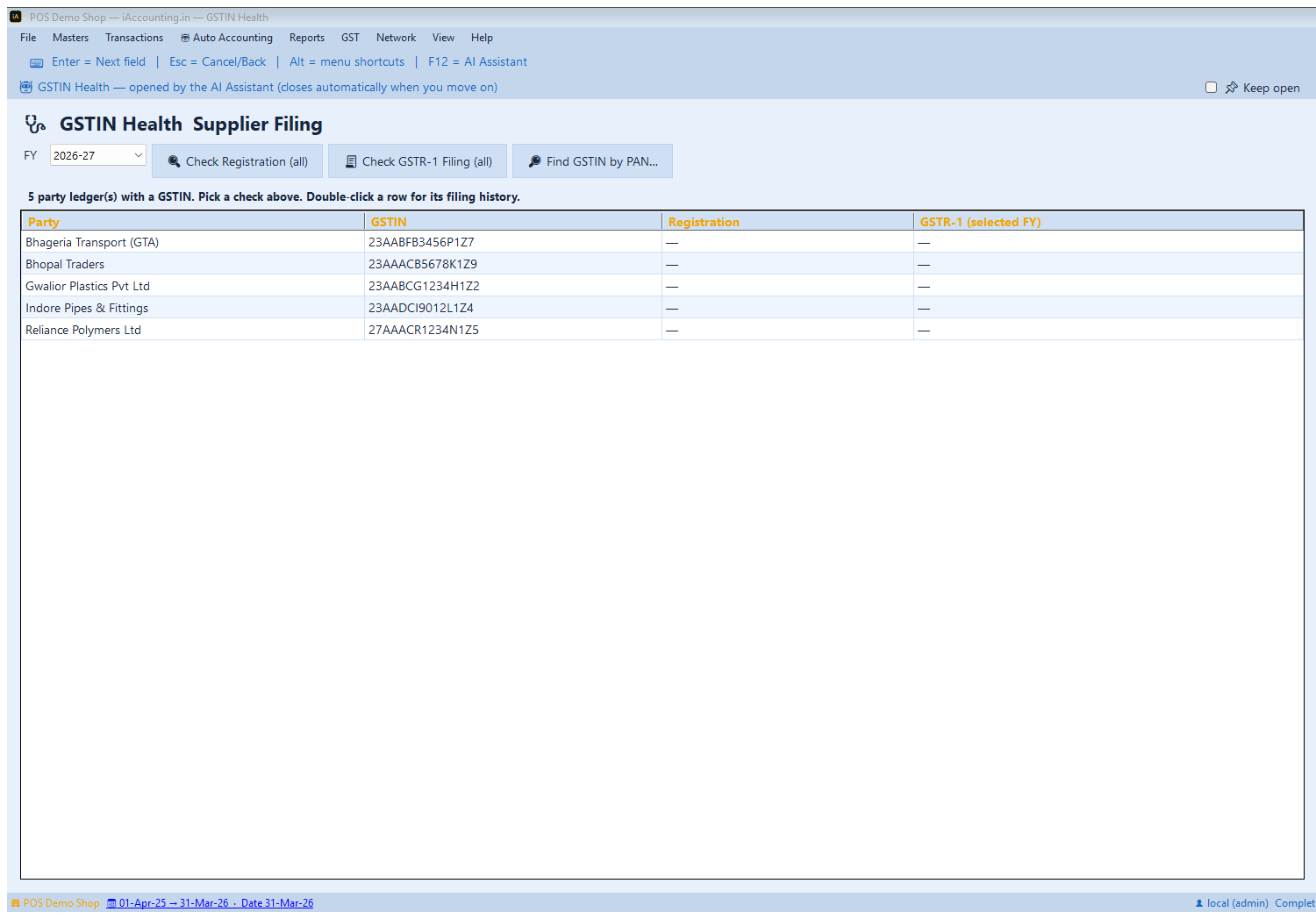
Check Registration
Sweeps every party ledger with a GSTIN and reports the registration status, flagging any that are cancelled or suspended.
This matters commercially as well as for tax: a cancelled GSTIN means you should not be claiming credit on their invoices, and arguably shouldn't be transacting on those terms at all. Suppliers rarely announce a cancellation.
Check GSTR-1 Filing
Asks, for the financial year you pick, whether each supplier has actually filed their GSTR-1.
This is the early-warning version of 2B reconciliation. A supplier who hasn't filed cannot have put your invoice into your GSTR-2B — so that credit isn't claimable yet, and you'll discover it either here, now, or later when the credit is missing. Double-click a row for the filing history.
🔎 Find GSTIN by PAN
Enter a PAN and get every GSTIN registered against it. Useful when a supplier bills you from a different state than usual, or when you're verifying that a new vendor is who they say they are.
Each of these lookups spends one GSTIN-lookup credit from your wallet — they call the portal. The Advisor's own cross-checks remain free.
A Monthly Routine That Works
- Around the 10th — run the Advisor. Fix the issues while there's time before filing.
- After the 14th — reconcile GSTR-2B, now that the portal has generated it.
- For anything not in 2B — run Check GSTR-1 Filing on those suppliers to see whether they've filed at all, and chase them.
- Before filing 3B — work the Pre-Filing Checklist.
- Quarterly — re-run Check Registration across all suppliers.
- Once, now — read the ITC Reminders tab properly. Most businesses find at least one category of credit they've never claimed.
The Advisor costs nothing to run, so there's no reason to run it only at year end — the point is to find things while they're still cheap to fix.
What's Next?
- GSTR-2B Reconciliation — match your purchases against what suppliers actually filed
- File GSTR-3B — claim the credit you've verified
- Sales Invoice + e-Invoice + e-Way Bill — HSN and GSTIN accuracy matter most here
- Input Tax Credit Rules — the underlying law